
Sea of Remnants PC System Requirements (2026 Steam Specs)
PC specs from the Steam store (Nov 2026) vs the Wanderer Test notice, Dawnbreaker launcher gaps, and how to check your Windows hardware before the beta.
FAQ
What are the Sea of Remnants PC requirements on Steam?
Why do Wanderer Test requirements differ from the Steam page?
Does Dawnbreaker CBT publish PC specs?
Can I play Sea of Remnants on Steam Deck?
Will mobile or console betas share the same PC specs?
What PC specs does Sea of Remnants list today?
NetEase and Joker Studio publish two different Windows requirement tables, and both remain visible in official channels. The Steam store page (checked November 10, 2026) shows minimum and recommended specs for the planned 2027 Steam release. A separate table appeared in the February 2026 Wanderer Test Steam Community announcement, including a third Ultra tier and heavier storage notes.
We present both side by side with dates. We do not know why they differ, and we are not guessing (test build size, engine branch, or typo). Until the Dawnbreaker closed beta launcher publishes its own sheet, treat storage and RAM as the widest range the two sources allow.
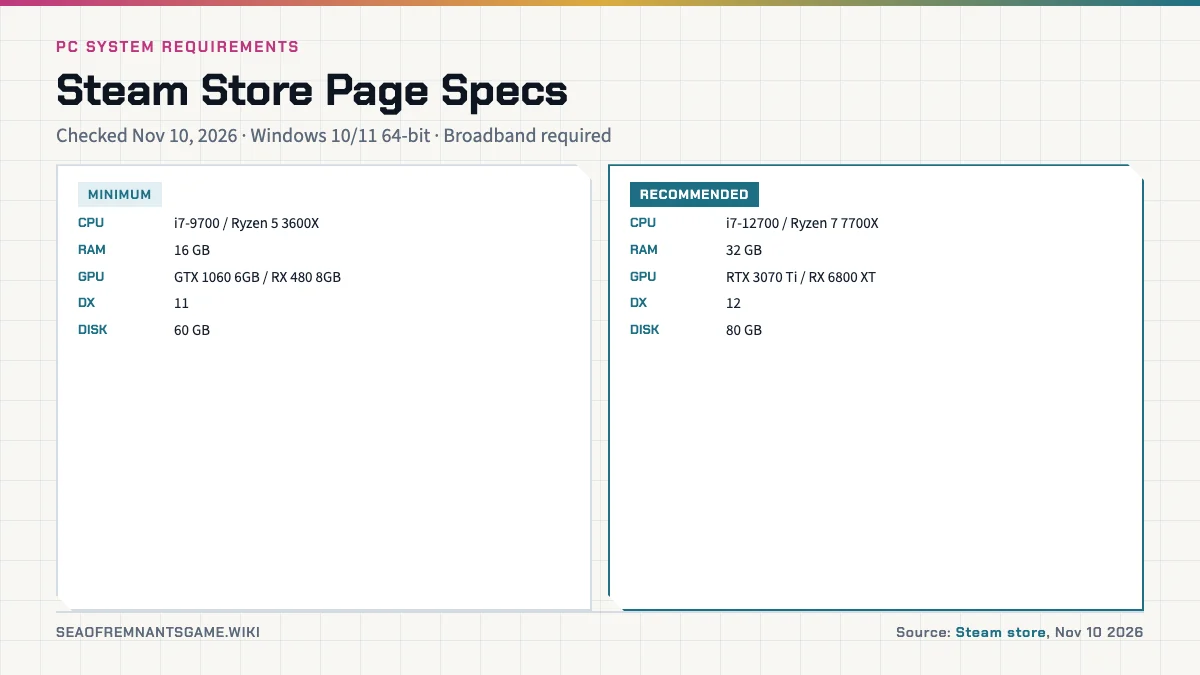
Source A — Steam store page (checked Nov 10, 2026)
| Tier | OS | CPU | RAM | GPU | DirectX | Storage |
|---|---|---|---|---|---|---|
| Minimum | Windows 10/11 64-bit | Intel Core i7-9700 / AMD Ryzen 5 3600X | 16 GB | GTX 1060 (6 GB) / RX 480 (8 GB) | 11 | 60 GB |
| Recommended | Windows 10/11 64-bit | Intel Core i7-12700 / AMD Ryzen 7 7700X | 32 GB | RTX 3070 Ti / RX 6800 XT | 12 | 80 GB |
Both tiers require a 64-bit processor and broadband internet, per the store listing.
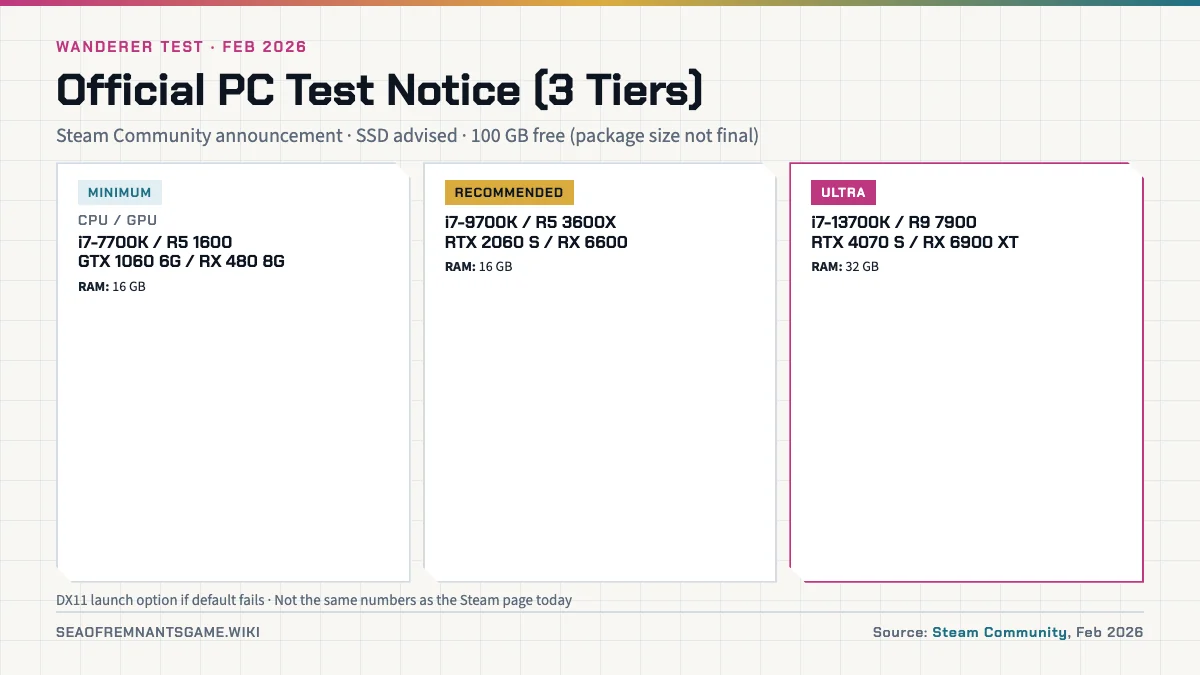
Source B — Wanderer Test notice (Steam Community, Feb 2026)
| Tier | CPU | GPU | RAM | Notes |
|---|---|---|---|---|
| Minimum | Intel Core i7-7700K / AMD Ryzen 5 1600 | GTX 1060 6 GB / RX 480 8 GB | 16 GB | SSD advised; ≥100 GB free space; package size stated as not final |
| Recommended | Intel Core i7-9700K / AMD Ryzen 5 3600X | RTX 2060 SUPER / RX 6600 | 16 GB | Same storage guidance |
| Ultra | Intel Core i7-13700K / AMD Ryzen 9 7900 | RTX 4070 SUPER / RX 6900 XT | 32 GB | Same storage guidance |
The notice also mentions a DirectX 11 launch option if default settings fail on your hardware.
How do the two requirement sheets compare?
Minimum CPU and storage are the biggest gaps. Steam’s minimum CPU is newer (i7-9700 class) than Wanderer’s i7-7700K floor, while Wanderer asks for more free disk space and an SSD. Steam’s recommended RAM is 32 GB; Wanderer’s recommended tier stays at 16 GB but adds Ultra at 32 GB.
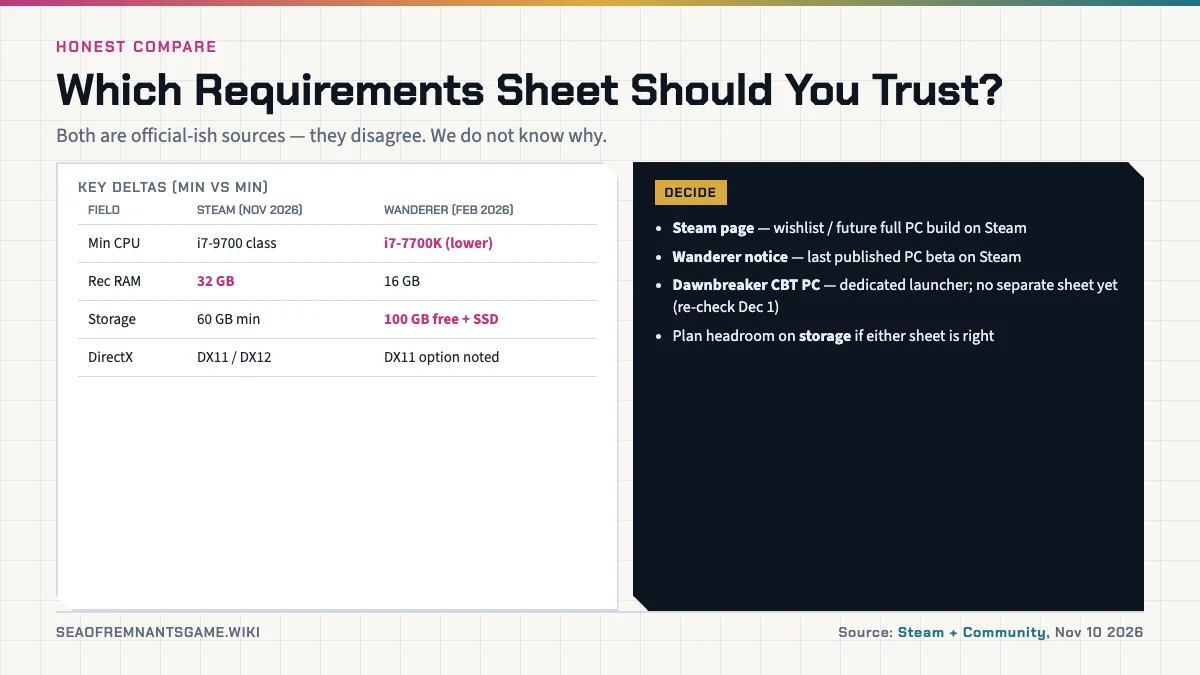
| Topic | Steam page (Nov 2026) | Wanderer notice (Feb 2026) |
|---|---|---|
| Minimum CPU | Higher floor (i7-9700 / R5 3600X) | Lower floor (i7-7700K / R5 1600) |
| Recommended RAM | 32 GB | 16 GB |
| Extra tier | None listed | Ultra (i7-13700K / R9 7900 class GPUs) |
| Storage | 60 GB min / 80 GB rec | ≥100 GB free + SSD advised |
| DirectX | 11 min / 12 rec | DX11 optional launch mentioned |
Use the Steam table when planning a future Steam install. Use the Wanderer table as historical beta guidance only; that test ended in February 2026. For the upcoming Dawnbreaker CBT, follow the join guide and launcher instructions rather than assuming either table copied forward unchanged.
What about Dawnbreaker CBT, mobile, console, and Steam Deck?
The Dawnbreaker CBT (opens December 3, 2026 at 16:00 PT per the Games Press release) runs on PlayStation, Xbox Series, PC via a dedicated launcher, iOS (TestFlight), and Android. No separate PC requirement sheet for that launcher has been published as of Nov 10, 2026. We will update this page when the launcher or release and platforms docs add numbers.
Mobile and console requirement sheets for the global version are not published on the sources we track. Steam Deck support is not announced; do not treat unofficial Deck charts as official.
Global monetization and storage downloads are unrelated to specs, but if you are budgeting disk space before pre-download on December 1, see also gacha and monetization (install size may grow with assets) and the China vs global note that the China client shipped earlier on its own schedule.
How can I check my own Windows PC?
These steps are standard Windows knowledge, not game-specific requirements. They help you compare your hardware labels to the tables above.
- Press Win + R, type
dxdiag, press Enter. On the System tab, read Processor and Memory. On the Display tab, read Name (GPU) and Approx. Total Memory (video RAM). - Open Task Manager → Performance. Select CPU, Memory, and GPU to see live models and installed RAM while idle.
- For free disk space, open Settings → System → Storage, or check the drive where you plan to install the beta launcher.
If your GPU is below both minimum lines but close, wait for Dawnbreaker launcher guidance rather than assuming the February DX11 workaround still applies.
Related Articles
guides
Sea of Remnants Closed Beta: Dawnbreaker Test Guide
Dawnbreaker closed beta dates, time zones, platforms, roster size, and what is included in the December 2026 global test—sourced from the Nov 9 announcement.
guides
How Sea of Remnants Plays (Wanderer Test Gameplay)
How Sea of Remnants plays: real-time naval combat, turn-based land fights, and dice initiative from Feb 2026 Wanderer Test previews—not Dawnbreaker stats.
guides
How to Join the Sea of Remnants Closed Beta (Dawnbreaker)
Dawnbreaker beta access: follow official channels, pre-download Dec 1 at 12:00 UTC, install per platform, log in early Dec 3—slots are limited FCFS.
Was this helpful?
Thanks for the feedback!